How to Redeem Ragdoll Boxing 3D Codes
Exact Ticket-button steps, mobile tips, and troubleshooting when a code returns invalid.
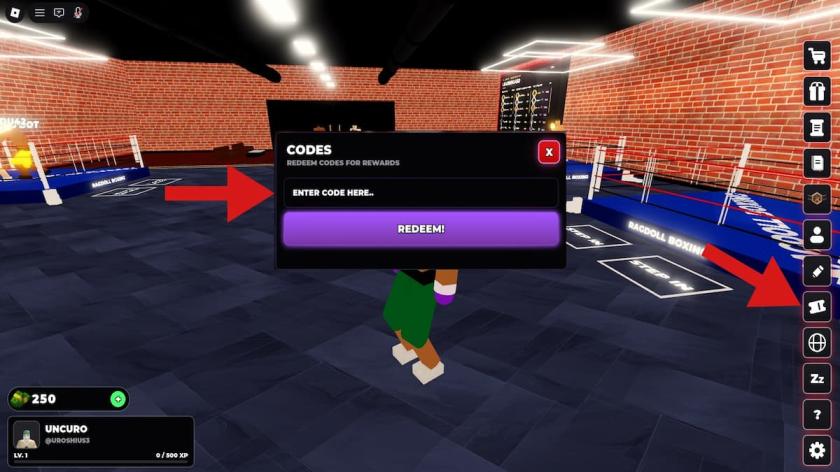
Redeeming codes in Ragdoll Boxing 3D takes less than a minute once you know where the Ticket button lives. This guide walks through PC, controller, and mobile flows, explains what each success message should look like, and covers the failure cases players hit most often — expired strings, missing underscores, redeeming mid-fight, and confusing this title with other Roblox boxing games.
Keep the live list open on the Codes Hub while you redeem. The November 14, 2026 wave includes fresh Lucky Spin and Cash gifts (RANKREWARDS, NEWMAP, BUGFIXES, NEWCODEAT10KLIKES, plus longer-running strings). After rewards land, jump to Getting Started if you still need controls, or the tier list before you burn Lucky Spins on a random build. Official Discord is a quiet place to hear about the next drop; ignore anyone DMing “verify” links.
Before you start
- Join the official place: Ragdoll Boxing 3D Season 1 (universeId
10770779724, placeId96740842890477). - Use your own Roblox account. Codes never require your password in a browser form.
- Finish the tutorial match (or return to the lobby afterward). The Ticket redeem UI is meant for post-tutorial lobby use, not mid-bout in a 16-player server.
- Copy codes from a trusted list — do not type from memory when underscores matter (
UPDATE_2,CODE_AT_2K_VISITS).
Step-by-step redemption
1. Open the Ticket button
On the right side of the lobby UI, tap or click the Ticket button. Players consistently describe it as roughly the fifth icon from the bottom of that right-hand stack. If you only see fight, shop, or Season Pass buttons, rotate the camera or open the main side menu — the Ticket entry sits with other social / reward utilities, not inside Settings.
2. Focus Enter code here
The panel shows a text field labeled Enter code here (wording may appear in all caps in-client). Click it once so the caret appears. On mobile, the on-screen keyboard should open automatically.
3. Paste the exact string
Paste with Ctrl+V / Cmd+V or long-press Paste on mobile. Confirm:
- No leading or trailing spaces
- Correct underscores (
UPDATE_2, notUPDATE2) - Correct milestone spelling (
NEWCODEAT10KLIKES,CODE_AT_2K_VISITS,NEWMAP,BUGFIXES) - For ranked rewards, try
RANKREWARDSfirst, thenRANKEDREWARDSif the game rejects the shorter form
4. Press Redeem
Hit Redeem and wait for the confirmation toast. Cash should appear in your currency readout; Spins / Lucky Spins should increment in the spin / build UI. If nothing changes, do not spam the button — check the error text first.
5. Verify inventory
Open your build / spin screen and cosmetics wallet. Lucky Spins feed Season 1 height, wingspan, and weight rolls (up to 7’0”). Cash covers KO effects, glove trails, emotes, tattoos, and hair. Regular Spins from 1MVISITS still help early iteration before Ranked Bronze→Champion climbs or Story Mode’s 24-fighter island tournament.
Platform notes
PC: Mouse the Ticket icon on the right rail, paste with keyboard shortcuts, then redeem. You can keep WASD movement unbound while the modal is open.
Controller: Navigate the lobby UI with the stick / D-pad until the Ticket icon highlights, confirm to open, then switch to on-screen keyboard or a paired keyboard for paste accuracy. Controller fight binds (L2/R2 hooks, R1 uppercut, L1 overhand, B block, Y/A weave, X lean back) do not affect the Codes modal.
Mobile: Use punch-button or swipe layouts elsewhere, but for codes rely on tap + Paste. If the Ticket button is hidden behind move controls, open Settings and temporarily hide or reposition move buttons so the right-side icons stay tappable.
Troubleshooting when a code fails
”Invalid” or “doesn’t exist”
- Re-copy from the Codes Hub — one missing underscore breaks
UPDATE_2andCODE_AT_2K_VISITS. - Try the alternate ranked spelling (
RANKREWARDS/RANKEDREWARDS). - Confirm you are in Ragdoll Boxing 3D, not Ragdoll Boxing or Ragdoll Robot Boxing.
”Already redeemed”
Each code is typically once per account. You will not get a second payout. Switch accounts only if you intend to farm alts; never share passwords.
”Expired”
Community lists lag behind live shutdowns. UPDATE2 (no underscore) is already reported expired even while UPDATE_2 still works. When a formerly listed code dies, wait for the next likes / visits / patch drop — or a Discord announcement — instead of retrying endlessly.
Panel missing or button greyed out
Finish the tutorial match, return to the lobby from a fight, or rejoin the place. Codes are not meant to be redeemed mid-bout while you are weaving with Q/E or holding F block.
Rewards not showing
Rejoin the experience once. Soft currency UI can lag after a redeem. If Spins still fail to appear after a full rejoin, note the exact code and error string for the next updates check — do not buy third-party “recovery” services.
After you redeem
- Spend Lucky Spins toward a deliberate build instead of panic rolling.
- Bank Cash for cosmetics that keep your fighter readable in Story, Ranked, and 2v2 tag team.
- Clear daily quests, touch Level Road, and claim Season Pass free tracks so code rewards stack with login progression.
- Practice clean head shots — they hit hardest — and learn knockdown timing (three downs wins) before you burn resources on cosmetics only.
If you later experiment with automation, read the Scripts Hub and CM Hub pages first. Scripts are unrelated to official codes, can violate Roblox rules, and should stay on throwaway accounts.
FAQ-ready checklist
- Tutorial match → right-side Ticket button (often fifth from bottom) → Enter code here → Redeem
- Underscores matter
- Codes are community-reported and may expire
- Official place only; no password forms
- Cross-check live strings on the Codes Hub every major update
Bookmark this page with Getting Started and the tier list so every new code turns into a better Season 1 fighter instead of unused currency sitting in the lobby.
Frequently Asked Questions
Quick answers about codes, builds, and combat.
Where is the Codes button in Ragdoll Boxing 3D?
After the tutorial match, look for the Ticket button on the right side of the lobby UI — often the fifth icon from the bottom. Open it, paste into Enter code here, then press Redeem.
Do I redeem codes during a fight?
No. Finish the tutorial or return to the lobby first. Mid-match UI focuses on punches, block, weave, and lean — the Ticket panel belongs in the lobby.
Why does my code say invalid after I typed it carefully?
Check underscores (UPDATE_2, CODE_AT_2K_VISITS), try RANKREWARDS vs RANKEDREWARDS, remove spaces, and confirm you are in Ragdoll Boxing 3D by Ragdoll Boxing Studios.
Can I redeem the same code twice?
Usually no. Once an account successfully redeems a code, further attempts return already redeemed.
Codes work but I see no Spins — what now?
Rejoin the place once and recheck the spin / build UI and Cash total. If still missing, the toast may have been an error — compare against the live Codes Hub list.